Shopify's three sub-Plus plans in 2026 are Basic, Grow, and Advanced, at $39, $105, and $399 monthly, or $29, $79, and $299 with the 25 percent annual discount. The plan that fits is decided less by sticker price than by staff seats, transaction fees, and the 2026 changes to both.
- Grow is the renamed middle plan, formerly just called Shopify. Same price, same features, only the name changed in 2026.
- Basic no longer includes any staff accounts. The owner is the only login, so a second user means upgrading to Grow.
- Online card rates are 2.9 / 2.7 / 2.5 percent plus 30 cents. Using a non-Shopify gateway adds 2 / 1 / 0.5 percent.
- The April 2026 Payments changes add surcharges for Premium cards (business and Amex) and international cards above the base rate.
If you sell on Shopify and you are not yet on Plus, you live on one of three plans: Basic, Grow, or Advanced. The pricing page makes them look like three sizes of the same thing, but what separates them is staff seats and the cut Shopify takes on every order, and both moved in 2026 in ways the headline price never shows. This post decodes all of it for a brand owner trying to pick the right plan rather than the cheapest one.
On monthly billing, Basic is $39, Grow is $105, and Advanced is $399. Pay annually and the 25 percent discount drops those to $29, $79, and $299 a month, billed once a year. The middle plan got renamed from Shopify to Grow in 2026 with no price change. Basic lost its staff accounts. And in April 2026, Shopify Payments started charging more for certain card types. Each of those four facts can change which plan you should be on, and the rest of the post explains why.
I have a particular vantage point here: I helped build and scale the Shopify Partner Program early on, so I watched how the platform thinks about packaging and what it puts behind each price tier. Then I co-founded a brand group that ran stores across this whole ladder, from a single Basic store testing a new line to higher-volume stores where the transaction-fee math is the entire game. The plan question is almost always about the fee schedule underneath the monthly fee.
Who this is for: a brand owner or operator choosing between Basic, Grow, and Advanced, or wondering whether they are on the right one now. If you are already at Plus scale, most of this is below your tier, though the section on when the jump to Plus pays back is written exactly for the brand standing at that threshold. If you are pre-launch, read it to budget honestly before you commit, because the plan fee is the smallest part of what a real store costs, and I would rather you learn that here than on month four.
Every figure here is for a US-based store using Shopify Payments, current as of June 2026. Rates vary by country, and Shopify can change them, so treat the figures as the June 2026 shape of the deal and confirm against the live pricing page when you commit. For where these plans sit against the rest of the market, I keep an ecommerce platform comparison current.
The three plans,
side by side,
with the real fees.
This is the comparison I wish every brand looked at before signing up, because it puts the monthly price next to the two things that move your P&L: staff seats and the per-order cut.
| Dimension | Basic | Grow | Advanced |
|---|---|---|---|
Monthly price | $39 / mo | $105 / mo | $399 / mo |
Annual price 25% off, billed yearly | $29 / mo | $79 / mo | $299 / mo |
Staff accounts | 0 (owner only) | 5 | Up to 15 |
Online card rate Shopify Payments | 2.9% + 30¢ | 2.7% + 30¢ | 2.5% + 30¢ |
Third-party gateway fee on top of your gateway | 2.0% | 1.0% | 0.5% |
Best fit | Solo, early, testing | Two-plus people, real volume | Higher volume, margin-sensitive |
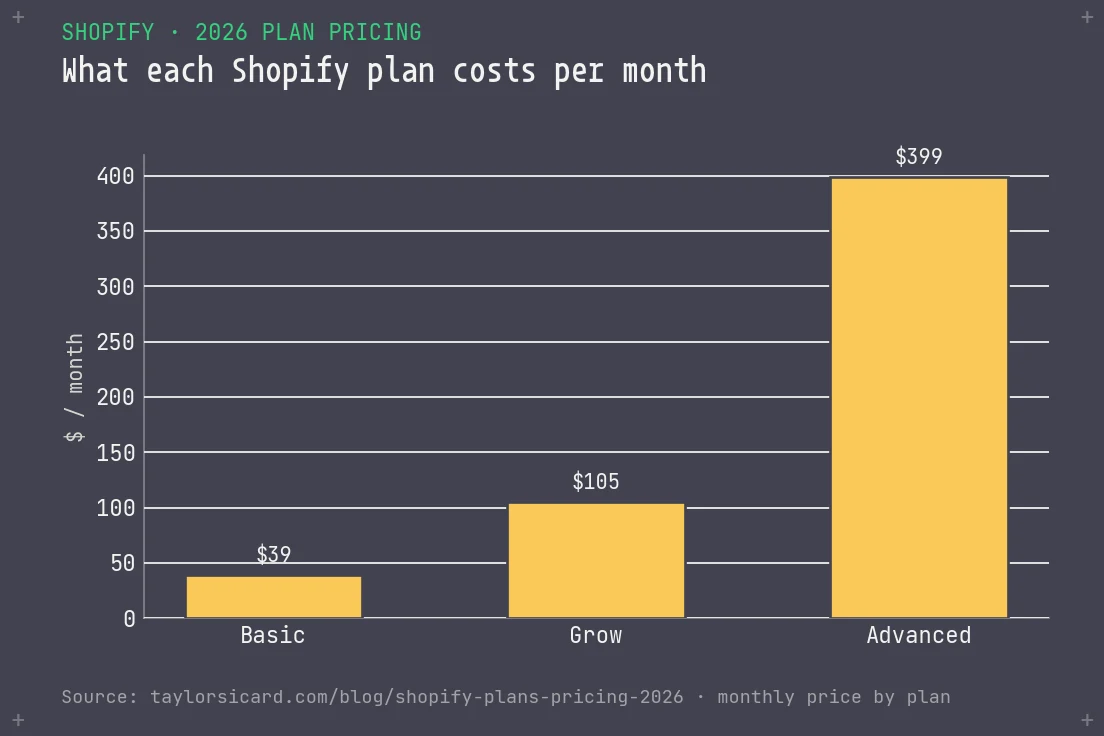
Read it top to bottom and the pattern is clear. The monthly price roughly triples at each step, while the costs that scale with you (the card rate and the gateway fee) move in your favor as you climb. Shopify charges more up front in exchange for taking less per order, betting you will graduate up as volume grows. Your job is to find the order volume where the lower per-order cut pays back the higher monthly fee, and the decision section works through that break-even math.
Grow is the plan
that used to be
called Shopify.
The most confusing change of 2026 is also the most harmless: Shopify renamed its middle plan from Shopify to Grow, and that is all it did. That old name was always a little absurd (the Shopify plan on Shopify), and the rename cleans it up so the ladder reads Basic, Grow, Advanced like a normal product line.
What did not change is what matters. The price stayed at $105 monthly and $79 annual, and so did the 5 staff accounts, the 2.7 percent plus 30 cent online card rate, and the 1 percent third-party gateway fee. Per Shopify's own Grow plan documentation, the feature set is the prior middle plan with a new label on the door. If you were on the Shopify plan, you are now on Grow at the same terms, and you owe nothing more.
"The Grow rename is a label swap, not a price hike. The change that actually costs you money is sitting one rung down, on Basic."
The reason I flag a non-change at all is that brand owners panic about plan emails, and a few have asked me whether the rename meant a price increase or a forced migration. It meant neither. Spend your worry budget on the staff-account change, which is the one that altered the deal.
The rename also says something useful. Shopify renamed the middle plan to Grow because the names are now meant to describe a progression: you start, you grow, you advance. That is marketing, but it is honest marketing, because the plans really are designed as a ladder you climb as your business gets bigger. The trap is taking the names too literally and assuming you must be on "Grow" because you are growing, or "Advanced" because you feel advanced. Your seat count and your processing volume set the right plan, whatever word matches your mood about the business. I have watched founders talk themselves onto Advanced because Grow felt like admitting they were small, which is an expensive way to manage your ego. Pick the plan the numbers point to, and let the name be a name.
Basic no longer
gives you a single
staff account.
This change reshuffles the ladder, and most pricing pages bury it. Shopify removed staff accounts from the Basic plan entirely, so Basic has zero seats. The store owner is the only login, confirmed directly in Shopify's Basic plan documentation, which lists staffing your store as an unavailable feature.
In practice, the moment you want a second person to have their own account (a part-time VA managing orders, a bookkeeper pulling reports, a designer touching the theme, a co-founder), you cannot do it on Basic. Your only path is to upgrade to Grow, which includes 5 staff accounts. That moves the practical floor for any business with more than one person from $39 a month to $105 monthly or $79 annual, the moment you need to delegate.
I read this as Shopify nudging real businesses up the ladder, and it works because sharing one login is a bad idea. You lose the audit trail of who changed what, you cannot scope permissions, and offboarding someone means changing the master password and praying. For a solo operator still finding product-market fit, Basic is fine and the constraint never bites. For anyone with a team, even a tiny one, the staff-seat change is the deciding factor, and it pushes the entry point to Grow. If you are mapping which tools belong at which stage, I lay that out in the Shopify tech stack by revenue guide.
A staff account is worth more than "another login," because it carries scoped permissions: you decide exactly what each person can see and do. Your fulfillment hire can manage orders and inventory without ever touching your financial reports, your payout settings, or your discount codes. Your bookkeeper can pull the numbers they need without the ability to change your theme. Your freelance developer can work on the store without seeing customer data. That permission scoping is the entire point, and a team gives it up the day it shares one owner login. A shared master account is sloppy, and it leaves a standing security and accountability hole.
The seat counts also tell you something about who each plan is for. Grow's five seats cover a small founding team plus a contractor or two, which is most brands in their first real growth phase. Advanced's fifteen seats are built for a store with actual departments: a marketing person, a few people in fulfillment and customer service, a finance hire, an agency partner. If you are approaching the point where fifteen named logins is not enough, you are almost certainly already in the conversation about Plus, which lifts the cap further. The seat ladder is a decent proxy for org size, and Shopify priced it that way on purpose.
What each rung
actually buys you,
line by line.
Price and fees decide most of the choice, but a few capability differences matter once you are running a real store. Every plan runs the same checkout, the same product catalog, the same themes, and the same App Store. What separates them is staff seats, how deep the reporting goes, how good the shipping discounts are, and how many inventory locations and international markets you can manage. The table puts it all in one place, so you are not clicking through four help-center pages to compare.
| Feature | Basic | Grow | Advanced |
|---|---|---|---|
Staff accounts extra logins with scoped permissions | 0 | 5 | 15 |
Inventory locations | 10 | 10 | 10 |
Reporting | Basic reports | Standard reports | Custom report builder |
Shipping discount on Shopify Shipping labels | Good | Better | Best |
Real-time carrier rates live calculated shipping at checkout | No | No | Yes |
Markets (international) | Included, 1 market | Included, 3 markets | Included, 3 markets |
Checkout, catalog, themes | Same | Same | Same |
App Store access | Full | Full | Full |
A couple of these deserve a sentence of operator translation, because the help-center labels undersell what they decide.
Reporting is the upgrade most people underrate. Basic gives you a thin slice. Grow opens up the standard reports most stores live in (sales by channel, by product, by traffic source). Advanced adds the custom report builder, which sounds like a nice-to-have until you are trying to answer a real margin question and the canned reports cannot slice it the way you need. If you make decisions off your data, and you should, the jump from Grow to Advanced is a data jump as much as a fee jump.
Real-time carrier rates is an Advanced-only feature that matters more than its placement suggests. It pulls live rates from your carriers and shows the exact shipping cost at checkout instead of a flat or estimated rate. For a brand shipping heavy, bulky, or wildly variable items, that one feature can be the difference between eating shipping margin and passing it through cleanly. For a brand shipping small, uniform parcels, it barely registers, so know which one you are.
Inventory locations are the same across all three plans, which surprises people who assume the higher tier gives you more warehouses. Every sub-Plus plan handles up to ten locations, whether that is a warehouse, a retail store, a pop-up, or a 3PL. So if your only reason for eyeing Advanced is "I have multiple locations," Basic and Grow handle that just as well. Location count only becomes a differentiator at Plus scale, where the cap lifts. This matters most for brands that sell both online and in person, where the cost of Shopify POS is the line that scales with locations, and your plan tier does not.
Markets is included on every plan now, which is a real change from the days when cross-border was a higher-tier privilege. The difference is how many distinct markets you can configure: one on Basic, three on Grow and Advanced. If you are selling into a couple of countries, Grow already covers it. The deeper mechanics of how Markets handles currency, duties, and localized pricing are worth understanding before you scale into it, which I cover in the Shopify Markets guide. The question of when Markets stops being enough and you need separate storefronts is its own decision, laid out in Markets versus expansion stores.
"Every plan runs the same checkout and the same App Store. You are not paying for a better store as you climb. You are paying for seats, deeper data, and a smaller cut per order."
Moving up the table does not buy you a better store: the checkout that converts your customer is identical on Basic and Advanced. What you buy is operational headroom (more people in the admin, deeper reporting, sharper shipping) and a smaller per-order cut. So the decision comes down to how much operational room and margin protection you need at your volume. For where each of these capabilities tends to get used as a brand scales, the stage-by-stage stack guide maps it to revenue.
The fee under
the fee is where
plans really differ.
Everyone compares the monthly price, but the transaction fee decides your margin, because it is charged on every order, forever. Two separate fees live here, and brands constantly confuse them.
The processing fee. When a customer pays by card and you use Shopify Payments, Shopify charges a percentage plus a flat 30 cents. That rate steps down as you climb: 2.9 percent on Basic, 2.7 percent on Grow, 2.5 percent on Advanced. This is the fee you pay no matter what, and it is the one that makes the higher plans pay for themselves at volume.
The third-party gateway fee. If you use a non-Shopify gateway (say, to run payments through a provider Shopify Payments does not cover), Shopify adds a surcharge on top of whatever that gateway charges you: 2 percent on Basic, 1 percent on Grow, 0.5 percent on Advanced. Use Shopify Payments as your processor and this surcharge disappears entirely. That is the platform's thumb on the scale to keep you inside its own payments rails, and for most brands the right move is to stay on Shopify Payments and never pay it.
The lever you control is volume. A brand doing $20,000 a month in card sales pays meaningfully less in processing on Advanced's 2.5 percent than on Basic's 2.9 percent, and at some point that gap outweighs the higher monthly fee. If you want to see where your business lands once every fee is in, run it through the DTC profitability calculator, because the plan that looks cheapest on the pricing page is frequently not the one that protects the most margin. The deeper version of that thinking is in my contribution margin breakdown.
A worked example, because the abstract version misleads
"The rate steps down" sounds harmless until you put dollars on it. Take a brand doing $50,000 a month in online card sales, all domestic consumer cards, on Shopify Payments. On Basic at 2.9 percent, the percentage portion of processing is $1,450 a month. On Grow at 2.7 percent, it is $1,350. On Advanced at 2.5 percent, it is $1,250. So moving from Basic to Advanced saves $200 a month in processing on this volume, while the plan itself costs about $270 a month more on annual billing. At $50,000 a month, Basic-to-Advanced is not yet worth it on processing alone, because the gap does not cover the extra plan fee.
Now run the same brand at $150,000 a month. The processing difference between Basic and Advanced widens to $600 a month, which comfortably clears the $270 plan-fee gap, and Advanced is clearly the right home. That is the whole mechanic in two numbers: the per-order cut is a percentage, so its dollar value grows with volume, while the plan-fee gap is fixed. Somewhere between those two revenue levels, the lines cross. Work out your crossover instead of guessing it, and do not let the bigger plan name talk you up the ladder before your volume has earned it.
One caveat on this math: the 30-cent flat fee per transaction does not change by plan, so a store with a low average order value and lots of small transactions feels the flat fee more than the percentage. If your AOV is $25 and you do thousands of orders, the 30 cents is a bigger share of your processing pain than the 0.2 percent rate difference, and the plan tier moves your total less. With a high AOV and fewer orders, the percentage rate dominates. Know which shape your store is before you optimize the wrong half of the fee.
In April 2026,
Shopify started
pricing cards by type.
Few brands saw this change coming, and it can raise your effective rate without you touching your plan. As of April 2026, Shopify Payments splits cards into two types and charges differently for each, and it layers a separate surcharge on international cards. Your headline rate (the 2.9 or 2.7 or 2.5 percent) is now the floor.
Standard versus Premium cards
Shopify now classifies every card as Standard or Premium. Standard means a normal domestic consumer card from Visa, Mastercard, Discover, or Diners Club, and it pays your base rate. Premium means a domestic commercial, corporate, or business card, plus all domestic American Express cards, and it carries an additional charge above the base rate, per Shopify's card-rate documentation. In practice, if your buyers tend to pay with business cards or Amex, a meaningful slice of your orders now processes above your quoted rate.
International cards
On top of card type, Shopify Payments adds a surcharge when a customer pays with a card issued outside your store's country: 1.5 percent on Basic, 1.0 percent on Grow and Advanced, above the base rate. If you sell cross-border, this stacks on the processing fee for every international order. The plan you are on changes how much that surcharge stings, which is another argument for climbing the ladder if a real share of your sales is overseas. Cross-border pricing, duties, and localized currency are their own deep topic, and the cleanest place to start is understanding how Shopify Markets handles selling internationally before you push into it.
The quoted rate applies to a domestic consumer card, and the moment a buyer uses a business card, an Amex, or a foreign card, you pay more. Your blended effective rate, the one that hits your margin, is almost always higher than the number on the pricing page, so if you sell B2B, sell premium, or sell internationally, model the blended rate. It is also a reason to know how Shopify Payments reserves work before they surprise your cash flow.
Say you are on Grow at a 2.7 percent base, and your order mix is roughly 70 percent domestic consumer cards, 15 percent business or Amex cards carrying a premium surcharge, and 15 percent international cards carrying the cross-border surcharge. Your blended rate lands somewhere north of 3 percent once you weight in the surcharged slices. On a brand doing $100,000 a month, that gap between the quoted rate and the blended reality is real money, several hundred dollars a month that never appears in your planning if you budgeted off the headline. The fix is to pull a month of payout reports, see your actual effective rate, and plan from that number. Treat the headline rate as a starting point; the blended rate is the only processing figure worth budgeting against.
The fee for not
using Shopify's own
payment rails.
This gets its own section because it is the most misunderstood line on the pricing page, and getting it wrong costs brands real money. If you process payments through Shopify Payments, the third-party surcharge is zero. It only appears when you choose a different gateway, and then Shopify charges you a percentage on every order on top of whatever that outside gateway already charges, a tax for leaving the house.
The surcharge steps down by plan: 2 percent on Basic, 1 percent on Grow, 0.5 percent on Advanced. Stack that on a typical outside-gateway rate and the real number gets ugly fast. The table shows the all-in cost when you route around Shopify Payments, assuming an outside gateway that charges roughly 2.9 percent plus 30 cents itself.
| Plan | Shopify surcharge | Your gateway (example) | Effective all-in |
|---|---|---|---|
Basic | 2.0% | ~2.9% + 30¢ | ~4.9% + 30¢ |
Grow | 1.0% | ~2.9% + 30¢ | ~3.9% + 30¢ |
Advanced | 0.5% | ~2.9% + 30¢ | ~3.4% + 30¢ |
Any plan, Shopify Payments no surcharge at all | 0% | 2.9 / 2.7 / 2.5% + 30¢ | Just the base rate |
Look at the Basic row. A brand on Basic running an outside gateway can pay close to 5 percent all in on every card order. On a product with a 40 percent gross margin, that is a meaningful chunk of your contribution margin handed to two payment companies instead of one. The fix is almost always boring: use Shopify Payments, skip the surcharge entirely, and pocket the difference.
A third-party gateway makes sense in three cases. One, you operate in a country where Shopify Payments is not available, so you have no choice. Two, you have a specialized payment method your business depends on that Shopify Payments does not support. Three, you have negotiated a processing rate so far below Shopify's that it beats the base rate even after the surcharge, which realistically only happens at serious volume. For the overwhelming majority of brands under Plus, none of those apply, and the surcharge is money you do not need to spend.
A percentage point or two of processing matters this much because it comes straight out of contribution margin, the same pool of money you use to pay for customer acquisition. Every point you hand to a redundant gateway is a point you cannot spend on ads or that you have to claw back somewhere else. When I work through a brand's maximum allowable CAC, processing fees are right there in the equation, because they directly shrink the margin you have to acquire customers with. A brand bleeding 2 percent on a needless gateway surcharge has cut its own acquisition budget, and the cut stays invisible until someone does the margin math.
Unless you are outside a Shopify Payments country or you have a rate you negotiated yourself that wins after the surcharge, stay on Shopify Payments. The third-party fee is the easiest unforced error on this whole pricing page to avoid. I have watched brands run an outside gateway for years out of habit, paying the surcharge the entire time, with no reason for it that survived a five-minute look.
The annual discount
is real money,
with one catch.
Shopify gives you a flat 25 percent off every sub-Plus plan if you pay for a year up front instead of month to month. On Basic it saves you about $120 a year, on Grow about $312, and on Advanced about $1,200. For a brand watching every line, the Advanced saving alone pays for a decent app or two, which is reason enough to look before you default to monthly out of inertia.
| Plan | Monthly billing | Annual (per mo) | You save per year |
|---|---|---|---|
Basic | $39 × 12 = $468 | $29 ($348/yr) | ~$120 |
Grow | $105 × 12 = $1,260 | $79 ($948/yr) | ~$312 |
Advanced | $399 × 12 = $4,788 | $299 ($3,588/yr) | ~$1,200 |
The catch is that you pay the full year in a single charge, and Shopify does not prorate a refund if you downgrade or leave mid-term. So the annual commitment is a bet that you will still be on Shopify, on that exact tier, twelve months from now. For an established brand, that is an easy bet and you should take the discount. For a brand still validating the product, still deciding whether Shopify is even the right platform, or likely to jump tiers soon, monthly buys you the flexibility, and the premium you pay for it is small.
My rule of thumb: if you have been live and selling for six months and you are confident in the platform, go annual and pocket the 25 percent. If you are pre-traction or unsure, stay monthly until you are sure, then switch. Do not let a sales nudge push you into an annual Advanced commitment before your volume justifies Advanced at all, because then you have locked in both the wrong tier and a year of it.
One more billing wrinkle to factor in if you are brand new: Shopify typically runs an introductory promotion where, after a free trial, the first few months land at a token rate like $1 a month before the standard price kicks in. That intro pricing is real and worth taking, but do not let it distort your planning. Budget for the standard rate from day one, because the intro window closes fast and the $1 figure tells you nothing about what the store costs to run once apps and processing are in. I have seen founders anchor on the $1 promo and get a rude surprise on month four. Treat the intro rate as a small bonus.
Your plan fee
is the smallest line
on the real bill.
What plan-comparison posts leave out is that the monthly plan fee is usually the smallest number on your Shopify bill, and the real spend lives in costs that never show up on the pricing page. Budget for the plan and nothing else and you will be off by a multiple.
The big hidden lines, roughly in order of how much they tend to cost a growing brand:
Apps. This is the line that surprises people: reviews, email and SMS, subscriptions, loyalty, upsells, a page builder, a help desk. Each is $15 to $300-plus a month, and a real store runs anywhere from a handful to a few dozen. App spend routinely dwarfs the plan fee, sometimes by ten times. This is why "Shopify costs $39 a month" is one of the most misleading sentences in commerce. I break the whole stack down by stage in the tech stack by revenue guide, because which apps you need changes completely as you scale. Rough monthly costs for the core app categories most DTC stores end up running:
| Category | Typical monthly cost | Why most stores run it |
|---|---|---|
Email & SMS | $30 – $500+ | Owned-channel revenue; scales with list size. |
Reviews & UGC | $15 – $300 | Social proof on product pages lifts conversion. |
Subscriptions | $50 – $500+ | Recurring revenue for consumable products. |
Loyalty & referrals | $25 – $300 | Repeat-purchase and retention lever. |
Upsell / cross-sell | $20 – $150 | Raises AOV at cart and checkout. |
Page builder / CRO | $20 – $100 | Landing pages and tests without a developer. |
Help desk / support | $0 – $300 | Tickets, chat, and order lookups in one place. |
Add up even a lean version of that list and you are at several hundred dollars a month before your plan fee enters the picture. A scaling brand running the fuller stack lands in the low thousands. That is the real Shopify bill, and it is why I tell operators to budget from the app stack down, not from the plan fee up. Every app should earn its line: if you cannot name the revenue or the hours it saves, it is a cost with no return, and most stores carry two or three of those at any given time.
Transaction fees. Covered above, but worth restating in budget terms: at 2.7 percent plus 30 cents, a store doing $100,000 a month in card sales pays roughly $3,000 a month in processing. That is far more than any plan fee, and it is the line that most rewards getting your plan tier right.
The theme. A premium Shopify theme is a one-time $200 to $400, or you pay an agency or freelancer to build a custom one, which runs from a few thousand to a lot. It is a one-time cost, and people forget to budget for it.
Point of sale. If you sell in person, Shopify POS adds hardware and, for the advanced features, a per-location software fee on top of your plan. It is its own cost stack, and I lay out exactly what it adds in the true cost of Shopify POS breakdown.
International selling. Markets itself is included, but localized payments, duties handling, and translation apps add cost once you go cross-border seriously. The base capability is free, and the polished version costs extra.
"Anyone who tells you Shopify costs thirty-nine dollars a month is quoting the smallest line on the bill. The plan is the cover charge. Apps and processing are the meal."
None of this is a case against Shopify, only a case for budgeting honestly. When I plan platform spend with a brand, the plan tier is the last thing we argue about, because it is rarely the number that moves the P&L. The real money sits in the app stack and the processing rate, so that is where the attention goes. For the fastest read on your true all-in cost as a percentage of revenue, the number that matters, use the DTC profitability calculator.
What Shopify really
costs at each stage
of a brand's life.
The table shows total cost of ownership by revenue band, drawn from the brands I have run and advised across this ladder. Every store's app stack and category margins differ, so these are ranges, but they are honest about the shape of the bill, which is the part the pricing page hides. Read each row as roughly what your monthly Shopify spend looks like at that stage, not as a quote.
| Annual revenue | Typical plan | Plan + apps + processing (per mo) | What dominates |
|---|---|---|---|
$0 – $1M finding traction | Basic or Grow | ~$300 – $700 | A lean app stack and processing; plan fee is minor. |
$1M – $5M scaling | Grow or Advanced | ~$1,500 – $4,000 | Apps and processing dominate; plan fee is a few percent of it. |
$5M – $20M mature DTC | Advanced (then Plus) | ~$5,000 – $15,000+ | Processing is the biggest line; Plus enters the conversation. |
Two things jump out of that table once you sit with it. First, at no band is the plan fee the thing that decides your spend. Even on Advanced, the $299 to $399 plan line is a rounding error against the app stack and processing. Anyone optimizing hard between Grow and Advanced on the monthly fee alone is staring at the wrong number. Second, processing fees scale linearly with revenue, which is why the plan tier matters at all. At volume, the one thing the plan really controls is your card rate, and at $5M-plus a year, shaving 0.2 percent off processing is worth more than the entire plan fee.
The point I push hardest with operators: you pick a Shopify plan to land on the right processing rate for your volume, with the seats and reporting your team needs, and saving on the plan fee barely enters into it. What decides it is the fee math, the staff seats, and the blended card rate, and the sticker price is a decoy. I built a free Shopify plan picker that runs your seats, volume, and billing term through this math. To pressure-test where your own numbers land against category benchmarks, the unit economics by category breakdown is a useful gut-check, and the broader how to read a profitability teardown shows how these costs flow all the way down to net.
The most useful lens I know for that table is your total Shopify spend as a percentage of revenue instead of a dollar figure. A healthy store usually sees the platform-plus-apps-plus-processing total fall as a share of revenue as it scales, because the plan fee and most app fees are fixed while revenue grows, and processing stays a roughly constant percentage. If your all-in Shopify cost as a percentage of revenue is climbing as you grow, something is wrong: you are either over-apped, paying a gateway surcharge you should not, or sitting on the wrong tier. That percentage is the best health check on this whole spend, and it is the number I look at first when I open a brand's books: the dollar total tells you what you paid, and the percentage tells you if you are paying smart.
When Advanced stops
being enough,
and Plus starts.
At some point the sub-Plus ladder runs out, and the question becomes whether to jump to Shopify Plus. Plus is a different kind of decision from picking between Basic, Grow, and Advanced, because it is a different product with a different price structure. Make the jump for specific reasons, not for the badge.
The economics first. Plus in 2026 starts around a flat $2,500 a month on a multi-year commitment, or roughly $3,000 monthly on a one-year term, and it moves to a variable fee of 0.25 percent of GMV once your monthly sales pass $1 million, capped at the top end. Against Advanced, what Plus mainly buys you on cost is a lower negotiated processing rate, and that is the lever that makes the math work. Most brands find Plus starts paying for itself somewhere around $500,000 to $800,000 a month in revenue, where the processing savings and the platform value outrun the higher fee. Below roughly $400,000 a month, Advanced is almost always the better economic answer, and Plus is a premium you are not yet getting paid back for.
How the variable fee works, and why it matters
The variable-fee structure trips people up. Below $1 million in monthly sales, you pay the flat base fee. Once you cross $1 million in a month, Plus switches you to 0.25 percent of that month's GMV instead of the flat fee, and that percentage is capped at the top so the very largest stores are not paying an unbounded amount. In practice, a store doing $1.5 million a month pays roughly $3,750 in platform fee that month under the variable rate. That is more than the flat base, but the lower processing rate on that volume usually saves more than the difference. The variable fee is Shopify taking a small slice of upside in exchange for the lower per-order rate, and for a high-volume store the trade is generally worth it. Your Plus bill moves with your revenue, so model a few months at your real volume before you anchor on the headline base number.
Cost is only half of it, and it is not the half that should drive the decision. Plus exists for brands that have outgrown what Advanced can do operationally: full control over the checkout, including custom checkout logic, more staff accounts, wholesale and B2B handled natively, multiple expansion storefronts, and the automation tooling that a high-volume operation relies on. If you are hitting walls on checkout customization or you need to run several storefronts for different markets or brands, those are Plus reasons regardless of where the pure fee math lands.
One Plus consideration that catches brands off guard: customizations that used to run on Shopify Scripts moved to a new framework, and if your store relies on script-based discount or checkout logic, that migration is part of the Plus conversation now. I cover what changed and what it means for your build in the Shopify Scripts sunset piece. And if B2B is part of why you are looking at Plus, know that B2B features now reach further down the ladder than they used to, as the B2B across all plans guide lays out, so you may not need Plus purely for wholesale.
The full Plus cost picture, including the all-in number once apps and the variable fee are in, is its own deep breakdown. If you are seriously weighing the jump, read the Shopify Plus pricing guide next, because the headline base fee is, predictably by now, the smallest part of the real number.
How to pick:
seats first,
then the fee math.
Forget the marketing names for a second. The plan decision comes down to two questions in order, and the order matters.
First question: do you need a second login? If yes, Basic is off the table, because it gives you zero staff seats. That single fact promotes most real businesses straight to Grow. If you are a solo operator and expect to stay that way for a while, Basic at $29 annual is the right answer, and you should not let anyone upsell you off it.
Second question: where does the fee math break even? Once you are choosing between Grow and Advanced, it is pure arithmetic. Advanced costs roughly $294 more a month than Grow on annual billing, and it shaves 0.2 percent off your card rate, from 2.7 to 2.5 percent. That 0.2 percent only saves you $294 a month once you are processing around $147,000 a month in card volume. Below that, Grow wins. Above it, Advanced starts paying for itself, and the gap widens as you grow. International and Premium-card mix shift the line, but that is the center of it.
Three real shapes of business show how the rule lands on actual stores. A solo maker doing $8,000 a month, one person, no team: Basic, annual. The staff-seat constraint does not bite because there is no second person, and at that volume the processing difference between tiers is a few dollars. Paying for Grow here is buying seats and a rate advantage you will not use. A four-person brand doing $90,000 a month: Grow, clearly. They need the staff seats, which rules out Basic entirely, and their card volume is below the Grow-to-Advanced crossover, so Advanced would cost more than it saves. A nine-person brand doing $300,000 a month with a real finance and ops team: Advanced, just as clearly. They are well past the processing crossover, they want the custom reporting to manage margin, and fifteen seats fits their org. The same questions produced three different answers, and the plan name decided none of them.
In all three cases, headcount and monthly card volume did the work, and that is the entire decision tree. State those two numbers honestly and the plan picks itself, so you can stop agonizing over a pricing page designed to make the choice feel harder than it is.
You can change plans, so do not over-engineer the first pick
Most pricing posts leave this out: switching plans on Shopify is easy and reversible. You can upgrade or downgrade from the admin in a couple of clicks, your store, products, orders, and data all come with you, and nothing breaks in the move. So the first plan you pick is not a marriage. If you start on Grow and your volume climbs past the Advanced crossover, you move up the day the math flips. If you over-bought Advanced and realize Grow covers you, you drop down and stop overpaying.
The only real friction is annual billing. If you committed to a year and want to drop a tier mid-term, you do not get a prorated refund of the difference, so the prudent move is to revisit your tier near each annual renewal, not to lock in aggressively up front. My practical advice: pick the plan your current numbers point to, set a reminder to re-check the fee math every quarter, and move the moment the crossover says to. Treat the plan as a dial you adjust as you grow. The brands that handle this well are the ones who checked the math regularly and moved when it told them to.
| If you are... | Plan | Why |
|---|---|---|
A solo founder, testing | Basic | One login is enough; lowest entry cost while you find traction. |
A two-plus person team | Grow | You need staff seats. Basic cannot give them to you at all. |
Doing real monthly volume, sub-$147K/mo cards | Grow | Lower gateway fee and full reporting until the fee math tips. |
High volume, margin-sensitive, $147K+/mo cards | Advanced | The 2.5% rate and 0.5% gateway fee pay back the higher monthly. |
Shipping heavy or variable items | Advanced | Real-time carrier rates pass true shipping cost to the buyer. |
Data-driven, need custom reports | Advanced | The custom report builder answers margin questions the others can't. |
$500K–800K+/mo, need checkout control | Plus | When negotiated rates and checkout customization outweigh the fee. |
The trap I see most is brands sitting on Advanced for the status while doing volume that Grow would handle for less, and brands clinging to Basic with a team, sharing one login and creating a security and accountability mess. Pick on seats and fee math, not on which tier sounds the most serious. Before the closing summary, here are the three plan-choice mistakes I watch operators make most, so you can sidestep them.
When you do outgrow Advanced, the next jump is to Plus, which is a different conversation entirely, covered in my Shopify Plus pricing breakdown. The same fee-math discipline applies if you sell in person, where the Shopify POS cost stacks on top of your plan. If you are still deciding whether Shopify is even the right platform for you, the platform comparison and the enterprise platform guide put it against the rest of the field.
The plan ladder rewards the brand that reads the fine print. Behind the sticker price, you are choosing a staff-seat tier and a per-order cut, and both moved in 2026: Basic lost its seats, the middle plan became Grow, and the card-type and international surcharges raised real effective rates. Pick on seats first and fee math second, model your blended rate instead of the headline, stay on Shopify Payments to skip the gateway surcharge, and budget for apps and processing as the real bill. Do that and you will land on the plan that protects your margin instead of the one that merely looks cheapest on the page. Where each of these tiers fits in the larger map of the platform is something I keep current in the 2026 ecosystem value map, and how plan choice tracks the stages a brand passes through is in the DTC growth inflection points guide.
What brand owners ask me
about picking a
Shopify plan.
On monthly billing, Basic is $39, Grow is $105, and Advanced is $399 per month. Pay annually and the 25 percent discount drops those to $29, $79, and $299 per month, billed once a year. Grow is the plan formerly called Shopify, renamed in 2026 with the same price and features. The full ladder sits next to the rest of the market in my platform comparison.
Grow is the renamed middle plan, formerly just called Shopify. The 2026 rename did not change the price ($105 monthly, $79 annual), the 5 staff accounts, the 2.7 percent plus 30 cent online card rate, or the 1 percent third-party gateway fee. Only the name changed, so do not assume you owe more after the rename.
No. Shopify removed staff accounts from Basic, so the store owner is the only login. If you need a second person to have their own account, even a part-time VA or a bookkeeper, you have to move up to Grow, which includes 5 staff accounts. For a two-person operation this single change often decides the plan. See the stage-by-stage view in my tech stack by revenue guide.
With Shopify Payments, online card rates are 2.9 percent plus 30 cents on Basic, 2.7 percent plus 30 cents on Grow, and 2.5 percent plus 30 cents on Advanced. If you use a third-party gateway instead, Shopify adds a surcharge of 2 percent on Basic, 1 percent on Grow, and 0.5 percent on Advanced, on top of your gateway's own fees. Model your real number in the profitability calculator.
Shopify Payments now separates card types into Standard and Premium and charges more for Premium cards, which are commercial, corporate, and business cards plus all domestic American Express. International cards also carry a surcharge above the base rate, 1.5 percent on Basic and 1.0 percent on Grow and Advanced. If your buyers skew business or overseas, your real rate runs above the headline number.
Annual billing is 25 percent cheaper on every sub-Plus plan. On Basic you save about $120 a year, on Grow about $312, and on Advanced about $1,200. The catch is you pay the full year up front and Shopify does not prorate refunds, so commit annually only once you are confident you are staying on Shopify and on that tier.
The plan fee is a fraction of the bill. A real store also pays for apps, a theme, transaction fees, email and SMS, and a developer now and then. In the brands I have run, a sub-$1M store lands near $300 to $700 a month all in, and a $1M to $5M store near $1,500 to $4,000 a month, mostly apps and processing, not the plan. The tech stack by revenue guide breaks it down.
Plus tends to pay back near $500,000 to $800,000 in monthly revenue, where the lower negotiated processing rate and the checkout control start to outweigh the higher platform fee. Below roughly $400,000 a month, Advanced is almost always the better economic answer. Plus is mainly a feature and rate decision. The full math is in the Shopify Plus pricing guide.
If the plan you land on is Plus, the fee is the smallest decision that follows. The rest are in Shopify Plus advisory.
Not sure your Shopify plan is protecting your margin?
I have run brands on every rung of this ladder across a multi-brand portfolio, and I helped build the platform that prices them. When the plan choice is really a unit-economics question, that is the call I help operators get right. If you want a second set of eyes on your fee math, let us talk.
Start a conversation See the case studies →A note on sources: plan prices, staff-account limits, feature differences, transaction fees, third-party gateway surcharges, the 25 percent annual discount, and the April 2026 card-type and international-card changes are from Shopify's official documentation, including the pricing page, the Basic plan and Grow plan feature pages, the US card-rate documentation, and the international fees page, all current as of June 2026 for a US store on Shopify Payments. The Shopify Plus base fee and variable-GMV figures reflect publicly reported 2026 terms and a multi-year versus one-year commitment; Plus pricing is negotiated, so confirm your own quote. Rates vary by country and can change, so verify against the live pricing page before you commit. The total-cost-by-revenue ranges, the plan-selection framework, the break-even math, and the read on which brand picks which plan are mine, from running stores across this ladder over a nine-figure portfolio and from helping build and scale the Partner Program.